Instagram multi-post automation
Three Reels. One guide. The same reply. Select the posts that belong to a campaign and manage their comment automation together—without switching your whole account to All Posts.
Included with Pro, Growth, Pro+ and Commerce. Free and Creator keep single-post selection or All Posts.
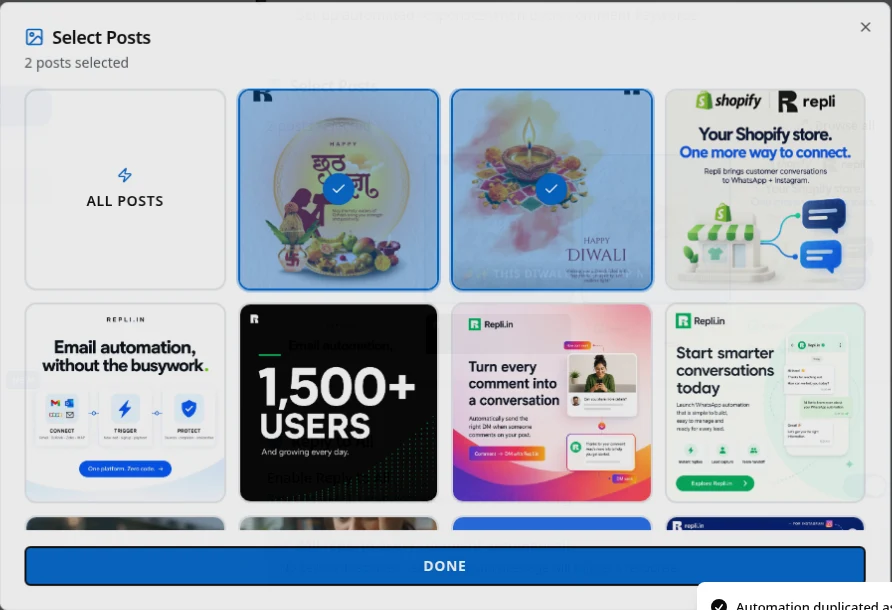
Example: one resource across a three-part Reel series
- Campaign: A coach publishes three exercise demonstrations. Each caption offers the same checklist to people who comment GUIDE.
- Post selection: Select those three Reels in one Comment-to-DM rule. Leave unrelated class announcements outside the selection.
- Configured DM: “Here is the checklist from the demonstration: [your checklist link]. Reply here if you have a question.”
This is an illustrative campaign, not a customer result or a promise of delivery. Use your own resource link and check recipient eligibility.
Can one Instagram automation run on multiple posts?
Yes. On Repli Pro and higher plans, one comment automation can target several selected posts or Reels on the same connected Instagram account. A matching comment on any selected post uses that rule’s configured reply.
The selection is saved with the automation. The posts share keywords, message text, buttons and other rule settings, so an edit to the rule applies across that selected group. This is different from creating a separate automation for every post.
Feature controls and plan checks reviewed on 21 November 2026. Message delivery remains subject to Instagram eligibility and permissions.
Set up a reply for a selected group of posts
- Choose the comment trigger: Open Comment-to-DM to send a private reply, or Comment Reply to answer publicly. Select the connected account for this campaign.
- Select the campaign posts: Select each post or Reel you want. Browse all opens larger previews; the dialog stays open while you select. Press Done when the group is right.
- Set the keyword and reply: Use the word promised in your captions, then write the message and verify any destination links. The selected posts share this configuration.
- Save, then check delivery: Save the automation. Test a matching comment from another eligible account on the selected posts and review the send result—not just the preview.
Related guides
- Copy a rule for a different campaign — Create a paused copy when the next campaign needs different settings.
- Comment-to-DM automation — Keywords, private replies and message setup.
- Public comment replies — Reply on the post rather than in a private message.
- Compare Repli plans — Plan access, billing periods and separate AI credit.
- Instagram setup documentation — Account setup and comment-automation controls.
Why teams choose Repli
- Keep a campaign’s replies together
- Select posts without targeting the whole account
- Change the selected group later
- Keep keywords and reply settings consistent
- Reuse existing comment-automation controls
- Review delivery in the message logs
What you get
A selected group, not every post
Include the posts and Reels that share an offer. Comments on unselected posts do not match this rule’s post selection.
Visible selection
Selected thumbnails stay highlighted. Browse all gives you larger previews and a selected-post count before you finish.
One set of reply settings
The same keywords, message, buttons and eligible follow-up settings apply to the group. Different offers belong in different rules.
Edit the group later
Reopen the saved automation to add or remove posts. Selecting All Posts replaces the selected group with account-wide targeting.
Overlap checks
An active automation with overlapping post targets and keywords can block another conflicting rule from activating. Review existing responders first.
The same Instagram safeguards
Multi-post selection does not bypass account permissions, recipient eligibility, Meta rate limits or messaging windows.
Use cases
Several clips, one full episode
Offer the same episode link from a set of podcast clips. One rule keeps the destination consistent across the selected Reels.
A product launch in stages
Use the same product-information reply on a reveal, a demonstration and a launch announcement—provided each post promises that same information.
A course or workshop series
Share one current syllabus or registration link from related posts. Split the rules when dates, availability or the offer change.
Selected posts versus All Posts
Use a selected group when an offer belongs to a campaign rather than your entire account. A GUIDE keyword on a fitness checklist should not accidentally send that checklist to someone asking about an unrelated recipe.
All Posts is an account-wide choice. It is useful when the same keyword and answer genuinely apply everywhere. It is not a shorthand for “the three posts I just selected”: selecting it clears the specific-post group.
A new Reel does not automatically join a saved selected group. Add it by editing the automation. The feature does not select your next post, schedule publication, or go back and message everyone who commented before the automation was enabled.
When to keep one rule—and when to make a copy
Keep one rule when the selected posts promise the same resource, use the same keyword and need the same reply. You can update a broken link once rather than hunting through several separately configured rules.
Make a separate rule when the response needs to differ. A product price list, a workshop syllabus and a booking link should not share a reply just because all three captions use INFO. Repli’s duplicate button gives you a starting point for the new rule; review its retained post targets before activating it.
One multi-post rule keeps one rule identity in the automation list. It does not merge conversations or promise per-post conversion reporting. Use the message logs to inspect actual sends, and treat clicks, signups and purchases as separate outcomes.
Plan access and message costs are separate decisions
Included with Pro, Growth, Pro+ and Commerce. Free and Creator keep single-post selection or All Posts.
Creator can still run separate Comment-to-DM automations for separate posts. That is not the same as selecting several specific posts inside one rule. You do not need multi-post selection to try a single-post automation on Free.
Selecting more posts does not create another connected account or an extra software seat. Your account capacity and any AI-credit usage retain their existing rules. A scripted reply is not automatically an AI generation; enabling AI or AI follow-ups carries the applicable credit terms.
Frequently asked questions
Which plans let me select multiple Instagram posts in one automation?
Pro, Growth, Pro+ and Commerce include multi-post selection for Instagram comment automations. Choose several posts or Reels from one connected account; they share the same keywords, reply and settings. Free and Creator support one specific post or All Posts, not a selected group of posts. Meta permissions and messaging rules still apply.
Can I select both Instagram posts and Reels?
Yes. Choose the available posts and Reels in the connected account’s picker. A group belongs to that account; it is not a cross-account post selection.
Can each selected post send a different reply?
Not inside the same rule. The group shares the rule’s keywords, message and settings. Create or duplicate another automation when a post needs a different reply.
Will a newly published Reel be included automatically?
No. A selected group contains the posts you saved. Edit the automation to add another post, or deliberately choose All Posts if account-wide targeting is appropriate.
Does selecting old posts send DMs to their past commenters?
No. Post selection is not a retroactive broadcast. The automation handles eligible incoming comment events while enabled; it does not replay the comment history.
Does multi-post selection change Meta’s messaging rules?
No. Required permissions, recipient eligibility, rate limits and applicable messaging windows remain in force. Check message logs to confirm whether a reply was actually sent.
Pricing · All features · How it works · Blog